This idea originally came from this Ideas Exchange post.
Since Salesforce does not offer an out of the box method of creating history records when certain changes are made to User records, here is a simple way we can do this with Apex.
I have included all the code for this in this Git repo here but here is a complete break down of all of the components involved…
- Create a custom metadata type which we can use to record which fields we want to track. In my code I call this metadata type ’User_History_Fields__mdt’.
- Create a custom object to store the history records – I call this object ‘User_History__c’ in my code.
- I have created a lookup field to the User object (apparently a Master/Detail relationship is not allowed to a user object) fields to store the original value, new value and field api name.
- Create a new Class which we will call from the User Trigger to create the history records, this is called ‘CreateUserHistory’ in my code.
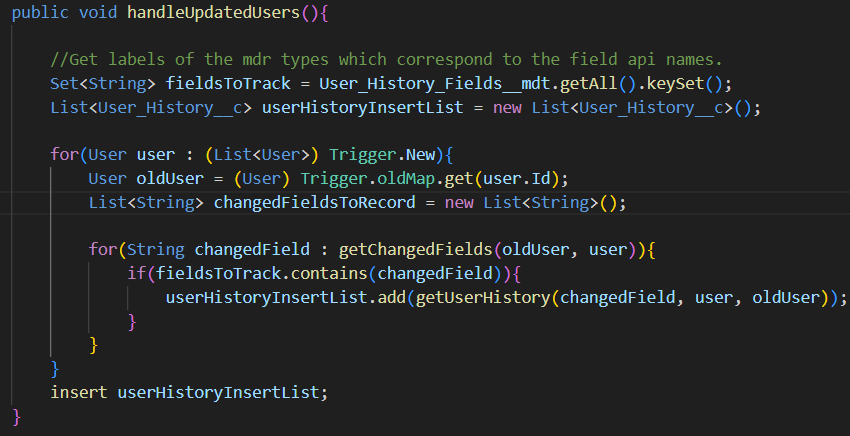
- The first method I create in this class is called ‘handleUpdatedUsers’. This will iterate over the updated user records and call separate methods to check which fields are changed and they match with the values that we want to track from the custom mdt type. Then it will insert the user history tracking records.
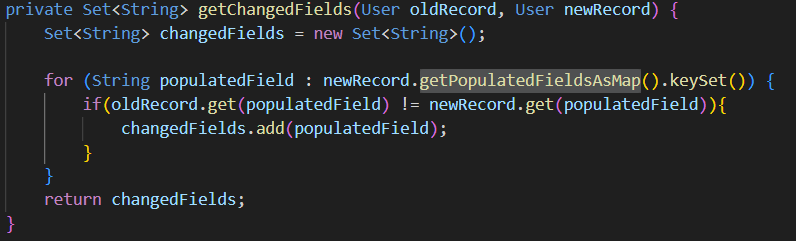
- The ‘getChangedFields’ method checks all the populated fields on the User record and compares those against the fields from previous version of the User record stored in Trigger.oldMap. If the field is changed, then it is added to the List<String> which is returned.
- The ‘getPopulatedFieldsAsMap’ is an Out of the box Salesforce method which returns a Map<String, Object> where the String is the field API name and the object is the field value.
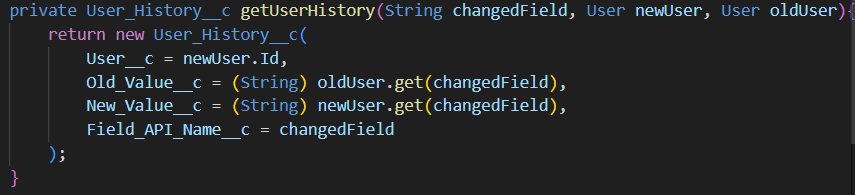
- The ‘getUserHistory’ method creates a ‘User_History__c’ object and writes to the fields that we had created in an earlier step.
4. Now deploy the CreateUserHistory class into the org if you haven’t already.
5. If there is not already a User trigger in the org, create a new one. Call the CreateUserHistory class from the trigger in an After Update context.

And that’s it! Please reach out if you have any questions. The test class can be found on the Git repo.
 Cloud Code Insights